Valheim 1.0: Best Mods and how to install them
Valheim’s full 1.0 release is here and is chock-full of content, but it is lacking considerably in quality of life features that a lot of people expected. It seems that Iron Gate’s artistic vision just doesn’t include these, but that doesn’t mean yours can’t.

Valheim 1.0: All spawn items commands list
In this article we’ll walk you through the easiest way of installing mods in Valheim 1.0 and the best ones to improve your viking odyssey.
How To Install Mods In Valheim 1.0
The simplest way to install Valheim mods is via the excellent GaleModManager. Head over to this link and press Manual Download to grab the Zip file. Extract its contents and install the program via the executable.
Open Gale and, in the top left corner of the app, select Valheim as your game to mod. Press the second icon on the left side and you’ll see a nearly endless list of mods to install. You can sort them by Last updated, Newest, Rating, or Downloads.
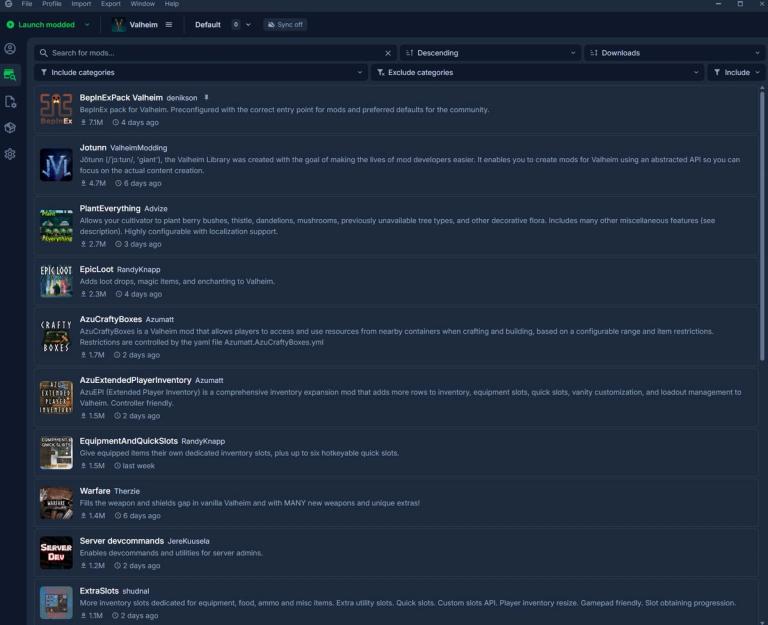
To install a mod, simply click on it and then press the big green “Install” button. It is really that simple. Just keep in mind that, in order for your mods to work, you need to use the “Launch modded” button on the top left of the screen from now onwards, instead of Steam.
Best Valheim 1.0 Mods
As we’ve hinted at with our introduction to this article, our focus for this mod list is quality of life, which is what is sorely missing from the full release of Valheim. There’s a lot of play and a lot to love, so mods that add content aren’t a priority for us, at least for now.
We didnt include links for the mods as it is not necessary. Just copy past the mod names into Gale and install them.
ModConfigs
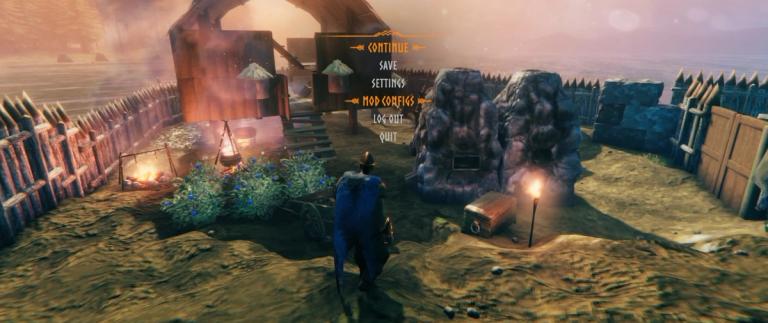
This mod adds an extra setting in your menu (only works in game, doesn’t show up in the main menu) which allows you to customize all mods you have installed. It uses the same UI as the vanilla Valheim settings and makes mod customization extremely simple.
PlantEverything
This is a simple mod that allows you to plant resources that vanilla Valheim doesn’t. With it installed you can plant berry bushes, mushrooms, thistle, dandelions, and a whole bunch of decorative flora to create luscious gardens.
If you want to customize things beyond the default, you can also lower the respawn timer for these resources, which usually sit at multiple hours of in game time (Blueberries take five real hours of playtime to respawn, as an example).
PlantEasily
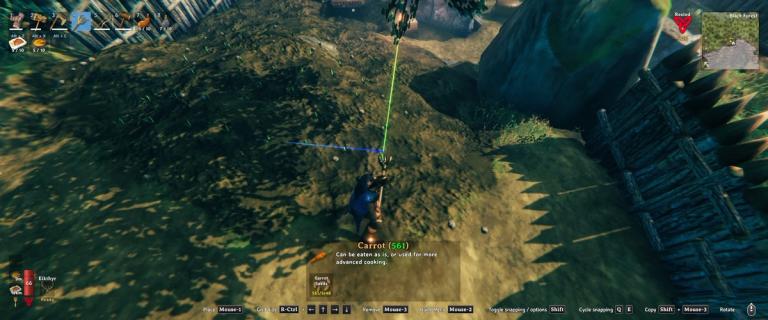
Developed by Advize, the same mod-maker behind PlantEverything, this mod is a must for solo players who want to have big farms. PlantEasily transforms your Cultivator into an industrial machine.
You can plant batches of resources with a single click (customizable using your arrow keys) and even lets you harvest in bulk by holding shift as you harvest. It is a massive time saver.
AzuCraftyBoxes
Another hero of Valheim’s modding scene is Azumatt, the creator of AzuCraftyBoxes. This mod allows players to craft from storage, a QoL feature present in most survival-crafting videogames nowadays.
AzuCraftyBoxes not only allows you to do this in a fully customizable way (you can change the range at which the chests work), it works phenomenally with AzuAutoStore, which lets you set up a system where chests automatically vacuum items that are already stored inside them. Lastly, you can set up an hotkey to store items from your inventory in all chests in a radius around you.
This will likely be the biggest time-saving mod in this list, especially for solo-players.
AzuExtendedPlayerInventory
Also developed by Azumatt, AzuExtendedPlayerInventory is a pretty self-explanatory mod, but it obviously goes even beyond it. As it says in the name, the mod adds an extra UI feature with all your equipment, a look at your character with it, and zero to eight extra hotkey slots.
Equipped items do not occupy inventory space. Furthermore, AzuExtendedPlayerInventory adds 10 equipment loadout sets so you can instantly swap all your equipped gear and it also comes with a full transmogrification system, allowing you to change your armor’s appearance to another one without changing their stats.
ValheimCommunityPatch
This gargantuan mod fixes a ton of known issues that the developers either didn’t get to in time for Valheim 1.0 or simply don’t consider an issue. The list is gigantic and features even performance increases, notably reducing traversal stutter which is widely present in vanilla Valheim.
If you want to take things even further, you also install CommunityPatchExtras, which adds a few more settings and fixes that the MidnightMods, the mod-makers, see as bigger changes to the vanilla experience.